Packer Challenge
Packer Challenge - PicoCTF
Hint 1: What can we do to reduce the size of a binary after compiling it.
The file was locked, compressed into a smaller form to obscure its contents. Nyx scanned it, recognizing the signature of a common packing method—designed to shrink, conceal, and deter analysis.
She initiated the unpacking process, stripping away its protective layer. The data expanded, restoring hidden sections. Now exposed, the raw contents revealed traces of something buried deeper.
A string of characters stood out, seemingly random yet deliberate. Converting the hex-encoded message, she extracted the passcode—hidden in plain sight, protected only by layers now gone.
The file was open. The secret was out.
The first step was to determine what kind of file we were dealing with. This is like checking a book’s cover before opening it. By analyzing the file’s structure, it became clear that it was a Linux executable (a program that can be run on a Linux system). However, something was unusual—this file lacked section headers, meaning it had been altered in some way..
For this example im going to open up Kali Linux and start running commands on the file named ‘out’
1
binwalk out
Binwalk is a tool used for analyzing binary files and detecting embedded files or compression. It scans for signatures of known formats (like archives, images, or encryption). The output tells us: The binary is an ELF 64-bit executable (Linux program). The file contains UPX compression (Copyright string: “Copyright (C) 1996-2018 the UPX Team.”). Offset 0x4AFA5 suggests where UPX starts compressing the data.
Next command
1
upx -d out
UPX (Ultimate Packer for Executables) is a tool that compresses binaries to reduce size. The -d flag tells UPX to decompress (unpack) the binary. The output confirms the file was successfully unpacked: pgsql The binary grew from 336 KB to 877 KB, meaning the original code has been restored.
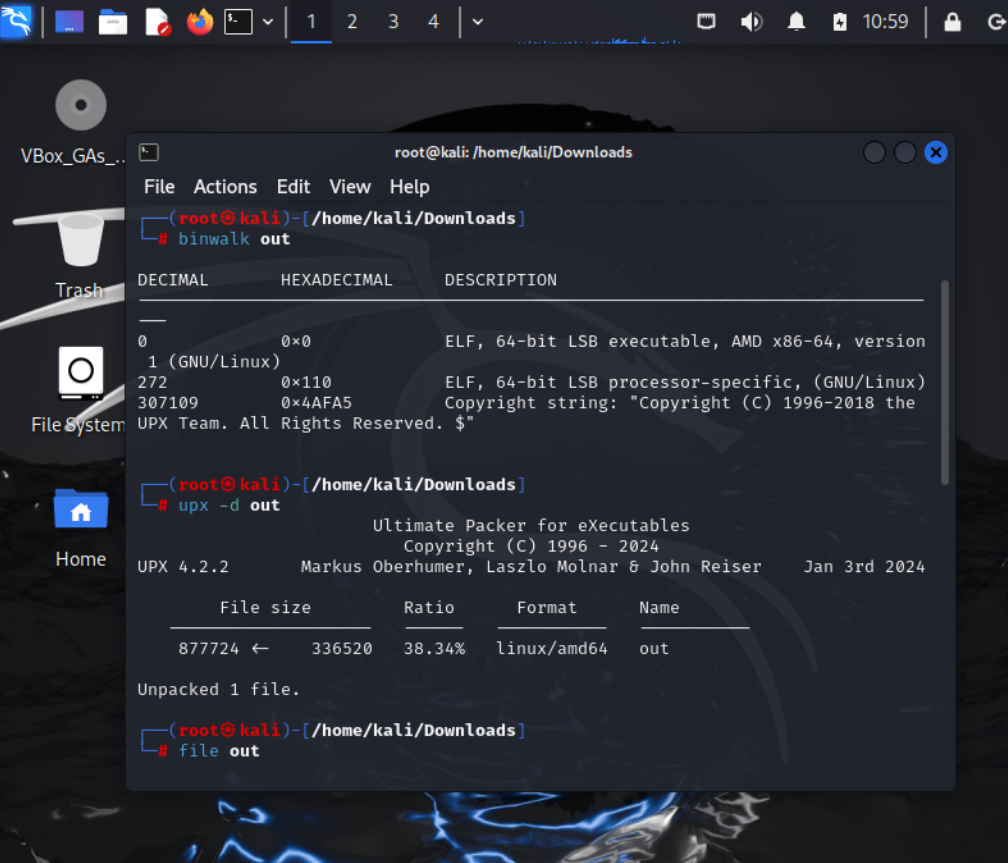
Then we want to verify the file to see if its been stripped or not
1
file out
After unpacking, file out now shows: pgsql CopyEdit out: ELF 64-bit LSB executable, x86-64, statically linked, not stripped
“Not stripped” means function names and symbols are still intact, making analysis easier.
Now lets run the program
1
2
chmod +x out
./out
Chmod +x out makes the file executable. ./out runs the program. The program prompts for a password, meaning there is a check inside the binary.
Lets check the file for anything with “pass” or “key” in it
1
2
strings out | grep -i pass
strings out | grep -i key
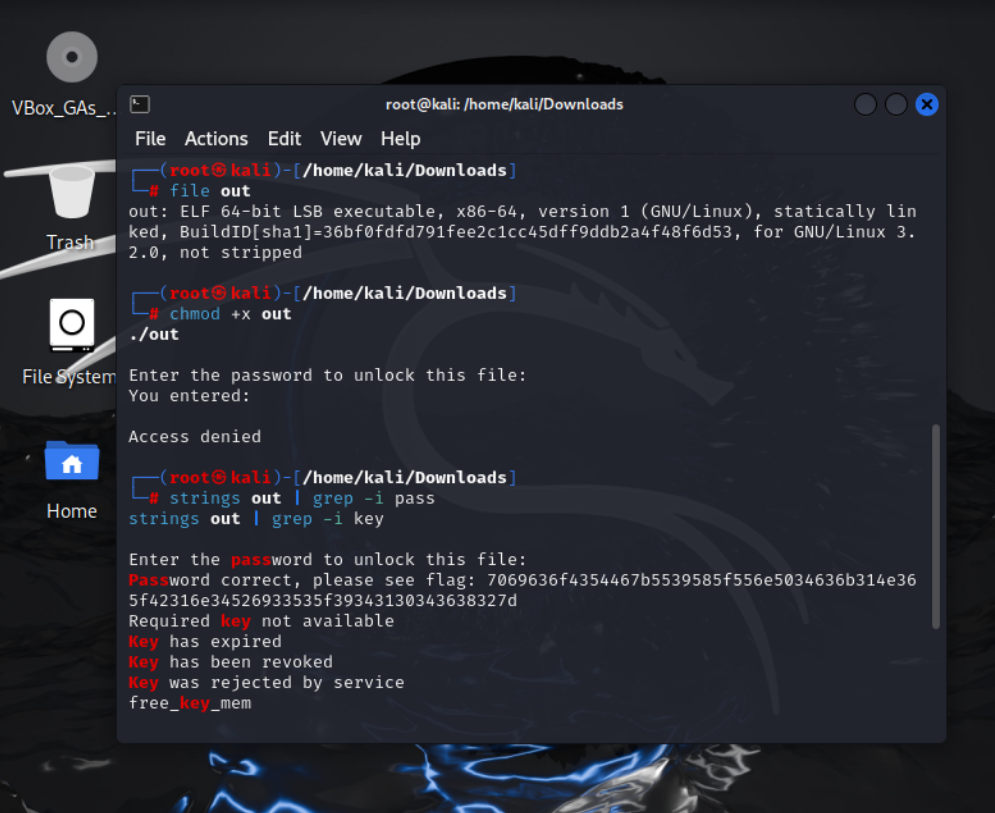
Strings out extracts readable text from the binary. grep -i pass filters lines containing “pass”.
This suggests the flag is already inside the binary in hex format.
Last step is to convert the hex to text format
1
echo 7069636f4354467b5539585f556e5034636b314e365f42316e34526933535f39343130343638327d | xxd -r -p
Echo outputs the hex string. xxd -r -p converts hex to text. This reveals the flag in the format picoCTF{…}
