Robots.txt
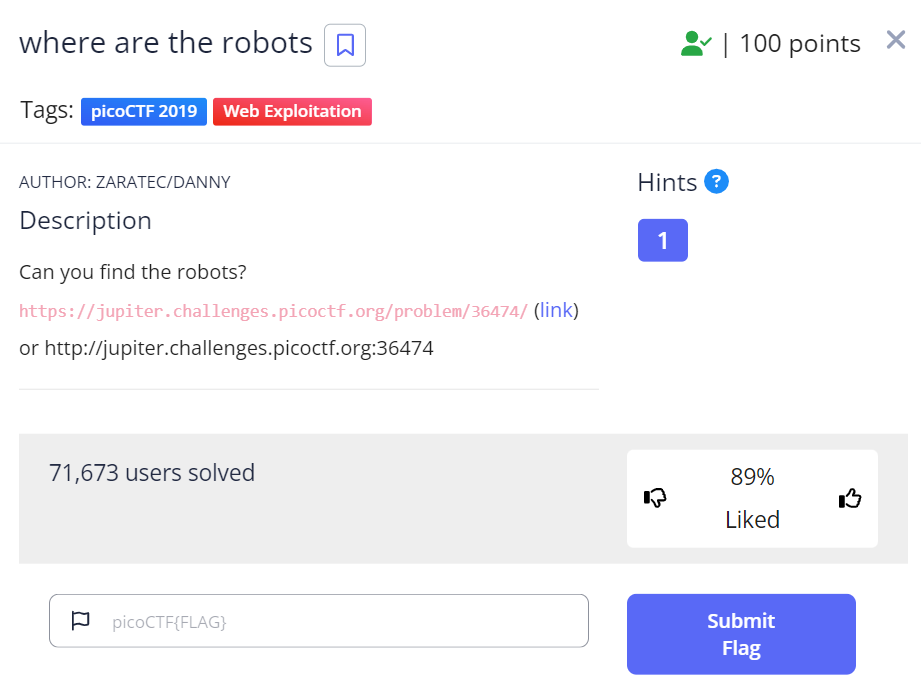
First off. Go to any website (google, amazon, facebook) and type /robots.txt at the end of it to see what im talking about
Hint 1: ‘https://www.facebook.com/robots.txt’ for example
In today’s digital exploration, we welcome you to a brief yet enlightening journey into one of the less conspicuous yet fundamental aspects of web security and management - the robots.txt file. A sentinel that operates quietly in the background of every website.
Introduction to the Digital Sentinels: Have you ever pondered on how search engines effortlessly index millions of web pages, making them accessible in your search results within seconds? Or how they know what parts of a website to avoid? The answer lies with a simple, often overlooked file: robots.txt.
The Role of Robots.txt: Located at the root directory of websites, the robots.txt file serves as a guide for web crawlers and robots, instructing them on which parts of the site they may and may not access. This mechanism ensures that sensitive information remains unindexed, protecting websites from potential security vulnerabilities.
Why “Where are the Robots?” Matters: The playful question “Where are the robots?” is not just a whimsical query but a prompt to delve deeper into the mechanisms that safeguard the integrity of websites. It’s an invitation to explore how webmasters use robots.txt to balance accessibility with privacy, making informed decisions about what content should be publicly searchable.
The Impact on Cyber Security: Understanding and properly configuring robots.txt is a crucial component of cyber security. It helps in preventing search engines from indexing sensitive content, such as admin pages, which could be exploited by malicious actors if discovered. However, it’s also important to note that robots.txt is a public file, and relying solely on it for security is insufficient. It acts as a first line of defense, part of a broader security strategy.
Finding the flag below https://jupiter.challenges.picoctf.org/problem/36474/
1
2
3
4
5
6
7
8
9
10
11
12
13
14
15
16
17
18
19
20
<!doctype html>
<html>
  <head>
    <title>Welcome</title>
    <link href="https://fonts.googleapis.com/css?family=Monoton|Roboto" rel="stylesheet">
    <link rel="stylesheet" type="text/css" href="style.css">
  </head>

  <body>
    <div class="container">
      <header>
	<h1>Welcome</h1>
      </header>
      <div class="content">
	<p>Where are the robots?</p>
      </div>
      <footer></footer>
    </div>
  </body>
</html>
https://jupiter.challenges.picoctf.org/problem/36474/robots.txt
1
2
3
4
5
6
<!doctype html>

User-agent: *
Disallow: /477ce.html

</html>
Here we find a hidden link inside the robots.txt
Lets check it out
1
2
3
4
5
6
7
8
9
10
11
12
13
14
15
16
17
<!doctype html>
<html>
  <head>
    <title>Where are the robots</title>
    <link href="https://fonts.googleapis.com/css?family=Monoton|Roboto" rel="stylesheet">
    <link rel="stylesheet" type="text/css" href="style.css">
  </head>
  <body>
    <div class="container">

      <div class="content">
	<p>Guess you found the robots<br />
	  <flag>picoCTF{ca1cu1at1ng_Mach1n3s_477ce}</flag></p>
      </div>
      <footer></footer>
  </body>
</html>
Final Thoughts
As we conclude our exploration, the message is clear: security in the digital realm is multi-faceted and requires attention to detail. “Where are the robots?” is not just a query but a reminder of the unseen layers that contribute to our online safety and the importance of understanding the tools at our disposal.
Remember, in the vast expanse of the internet, knowledge is your best defense. Stay curious, stay informed, and continue to explore the depths of cyber security awareness.
This write-up transforms the minimal content of the HTML snippet into a thematic exploration of a specific aspect of web security, aiming to educate readers about the importance of robots.txt in a context that blends curiosity with informative content.